Overview
Install
As for me, my environment is:
macOS Sierra 10.12.6
Python 3.6.3
pip3
The official command uses pip install --upgrade virtualenv. However, my MacBook Air doesn’t have pip and just can’t install pip using sudo easy_install pip. The error message isDownload error on https://pypi.python.org/simple/pip/: [SSL: TLSV1_ALERT_PROTOCOL_VERSION] tlsv1 alert protocol version (_ssl.c:590) -- Some packages may not be found!
There seems something wrong with openssl. But after updating openssl with homebrew, it still doesn’t work. Thankfully, I can install with pip3 instead.
So the full commands are as follows:
1 | pip3 install --upgrade virtualenv |
CS20
To learn TensorFlow, I’m following Stanford’s course CS20: TensorFlow for Deep Learning Research. So I’ve also installed TensorFlow 1.4.1 with the setup instruction.
There seems something wrong when importing tensorflow. The error message:/usr/local/Cellar/python/3.6.3/Frameworks/Python.framework/Versions/3.6/lib/python3.6/importlib/_bootstrap.py:219: RuntimeWarning: compiletime version 3.5 of module 'tensorflow.python.framework.fast_tensor_util' does not match runtime version 3.6
return f(*args, **kwds)
The solution is found here. Download the binary resource and use the command pip install --ignore-installed --upgrade tensorflow-1.4.0-cp36-cp36m-macosx_10_12_x86_64.whl (may be different on different on different machines).
Activation and Deactivation
Activate the Virtualenv each time when using TensorFlow in a new shell.
1 | cd targetDirectory |
Change the path to Virtualenv environment, invoke the activation command and then the prompt will transform to the following to indicate that TensorFlow environment is active:
(targetDirectory)$
When it is done, deactivate the environment by issuing the following command:
(targetDirectory)$ deactivate
Graphs and Sessions
Graphs
TensorFlow separates definition of computations from their execution.
Phase:
- assemble a graph
- use a session to execute operations in the graph
(this might change in the future with eager mode)
Tensor
A tensor is an n-dimensional array.
0-d tensor: scalar (number)
1-d tensor: vector
2-d tensor: matrix
and so on…
Data Flow Graphs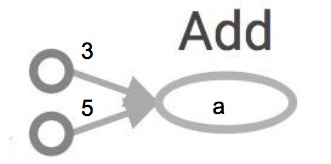
Nodes: operators, variables, and constants
Edges: tensors
Tensors are data.
TensorFlow = tensor + flow = data + flow
Session
Then how to get the value of a?
Create a session, assign it to variable sess so we can call it later.
Within the session, evaluate the graph to fetch the value of a.
Two ways:
1 | sess = tf.Session() |
1 | with tf.Session() as sess: |
A session object encapsulates the environment in which Operation objects are executed, and Tensor objects are evaluated.
Session will also allocate memory to store the current values of variables.
Why graphs
- Save computation. Only run subgraphs that lead to the values you want to fetch
- Break computation into small, differential pieces to facilitate auto-differentiation
- Facilitate distributed computation, spread the work across multiple CPUs, GPUs, TPUs, or other devices
- Many common machine learning models are taught and visualized as directed graphs
TensorBoard
The computations you’ll use TensorFlow for - like training a massive deep neural network - can be complex and confusing. To make it easier to understand, debug, and optimize TensorFlow programs, we’ve included a suite of visualization tools called TensorBoard.
When a user perform certain operations in a TensorBoard-activated TensorFlow program, these operations are exported to an event log file. TensorBoard is able to convert these event files to visualizations that can give insight into a model’s graph and its runtime behavior. Learning to use TensorBoard early and often will make working with TensorFlow that much more enjoyable and productive.
To visualize the program with TensorBoard, we need to write log files of the program. To write event files, we first need to create a writer for those logs, using the code writer = tf.summary. FileWriter ([logdir], [graph])
[graph] is the graph of the program that we’re working on. Either call it using tf.get_default_graph(), which returns the default graph of the program, or through sess.graph, which returns the graph the session is handling. The latter requires that a session is created.
[logdir] is the folder where we want to store those log files.
Note: if running the code several times, there will be multiple event files in [logdir]. TF will show only the latest graph and display the warning of multiple event files. To get rid of the warning, just delete the event files that is useless.
1 | import tensorflow as tf |
1 | python3 programName.py |
Operations
Constants
1 | # constant of 1d tensor (vector) |
a = tf.constant([2, 2], name='a')
Tensors filled with a specific value
1 | # create a tensor of shape and all elements are zeros |
Similar to numpy.zerostf.zeros([2, 3], tf.int32) ==> [[0, 0, 0], [0, 0, 0]
1 | # create a tensor of shape and type (unless type is specified) as the input_tensor but all elements are zeros |
Similar to numpy.zeros_liketf.zeros_like(input_tensor) # input_tensor = [[0, 1], [2, 3], [4, 5]] ==> [[0, 0], [0, 0], [0, 0]]
1 | # create a tensor of shape and all elements are ones |
Similar to numpy.ones, numpy.ones_like
1 | # create a tensor filled with a scalar value |
Similar to numpy.fulltf.fill([2, 3], 8) ==> [[8, 8, 8], [8, 8, 8]]
Constants as sequences1
2
3# create a sequence of num evenly-spaced values are generated beginning at start . If num > 1, the values in the sequence increase by (stop - start) / (num - 1), so that the last one is exactly stop .
# comparable to but slightly different from numpy.linspace
tf.lin_space(start, stop, num, name=None)
tf.lin_space(10.0, 13.0, 4) ==> [10. 11. 12. 13.]
1 | # create a sequence of numbers that begins at start and extends by increments of delta up to but not including limit |
tf.range(3, 18, 3) ==> [3 6 9 12 15]tf.range(5) ==> [0 1 2 3 4]
Randomly Generated Constants
tf.random_normal
tf.truncated_normal
tf.random_uniform
tf.random_shuffle
tf.random_crop
tf.multinomial
tf.random_gamma
tf.set_random_seed(seed)
Basic operations
Element-wise mathematical operations
Add, Sub, Mul, Div, Exp, Log, Greater, Less, Equal, …
Well, there’re 7 different div operations in TensorFlow, all doing more or less the same thing: tf.div(), tf. divide(), tf.truediv(), tf.floordiv(), tf.realdiv(), tf.truncatediv(), tf.floor_div()
Array operations
Concat, Slice, Split, Constant, Rank, Shape, Shuffle, …
Matrix operations
MatMul, MatrixInverse, MatrixDeterminant, …
Stateful operations
Variable, Assign, AssignAdd, …
Neural network building blocks
SoftMax, Sigmoid, ReLU, Convolution2D, MaxPool, …
Checkpointing operations
Save, Restore
Queue and synchronization operations
Enqueue, Dequeue, MutexAcquire, MutexRelease, …
Control flow operations
Merge, Switch, Enter, Leave, NextIteration
Data types
TensorFlow takes Python natives types: boolean, numeric(int, float), strings
scalars are treated like 0-d tensors
1-d arrays are treated like 1-d tensors
2-d arrays are treated like 2-d tensors
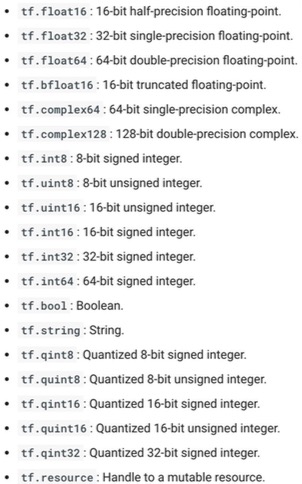
TensorFlow integrates seamlessly with NumPy
Can pass numpy types to TensorFlow ops
Use TF DType when possible:
Python native types: TensorFlow has to infer Python type
NumPy arrays: NumPy is not GPU compatible
Variable
Constants are stored in the graph definition. This makes loading graphs expensive when constants are big.
Therefore, only use constants for primitive types. Use variables or readers for more data that requires more memory.
Creating variables
1 | tf.get_variable( |
With tf.get_variable, we can provide variable’s internal name, shape, type, and initializer to give the variable its initial value.
The old way to create a variable is simply call tf.Variable(<initial-value>, name=<optional-name>).(Note that it’s written tf.constant with lowercase ‘c’ but tf.Variable with uppercase ‘V’. It’s because tf.constant is an op, while tf.Variable is a class with multiple ops.) However, this old way is discouraged and TensorFlow recommends that we use the wrapper tf.get_variable, which allows for easy variable sharing.
Some initializertf.zeros_initializer()tf.ones_initializer()tf.random_normal_initializer()tf.random_uniform_initializer()
Initialization
We have to initialize a variable before using it. (If you try to evaluate the variables before initializing them you’ll run into FailedPreconditionError: Attempting to use uninitialized value.)
The easiest way is initializing all variables at once:
1 | with tf.Session() as sess: |
Initialize only a subset of variables:
1 | with tf.Session() as sess: |
Initialize a single variable:
1 | with tf.Session() as sess: |
Assignment
Eval: get a variable’s value.print(W.eval()) # Similar to print(sess.run(W))
1 | W = tf.Variable(10) |
Why W is 10 but not 100? In fact, W.assign(100) creates an assign op. That op needs to be executed in a session to take effect.
1 | W = tf.Variable(10) |
Note that we don’t have to initialize W in this case, because assign() does it for us. In fact, the initializer op is an assign op that assigns the variable’s initial value to the variable itself.
For simple incrementing and decrementing of variables, TensorFlow includes the tf.Variable.assign_add() and tf.Variable.assign_sub() methods. Unlike tf.Variable.assign(), tf.Variable.assign_add() and tf.Variable.assign_sub() don’t initialize your variables for you because these ops depend on the initial values of the variable.
Each session maintains its own copy of variables.
Control Dependencies
Sometimes, we have two or more independent ops and we’d like to specify which ops should be run first. In this case, we use tf.Graph.control_dependencies([control_inputs]).
1 | # your graph g have 5 ops: a, b, c, d, e |
Placeholders
We can assemble the graphs first without knowing the values needed for computation.
(Just think about defining the function of x,y without knowing the values of x,y. E.g.,
With the graph assembled, we, or our clients, can later supply their own data when they need to execute the computation.
To define a place holder:tf.placeholder(dtype, shape=None, name=None)
We can feed as many data points to the placeholder as we want by iterating through the data set and feed in the value one at a time.
1 | with tf.Session() as sess: |
We can feed_dict any feedable tensor. Placeholder is just a way to indicate that something must be fed. Use tf.Graph.is_feedable(tensor) to check if a tensor is feedable or not.
feed_dict can be extremely useful to test models. When you have a large graph and just want to test out certain parts, you can provide dummy values so TensorFlow won’t waste time doing unnecessary computations.
Placeholder and tf.data
Pros and Cons of placeholder:
Pro: put the data processing outside TensorFlow, making it easy to do in Python
Cons: users often end up processing their data in a single thread and creating data bottleneck that slows execution down
tf.data
tf.data.Dataset.from_tensor_slices((features, labels))tf.data.Dataset.from_generator(gen, output_types, output_shapes
For prototyping, feed dict can be faster and easier to write(pythonic)
tf.data is tricky to use when you have complicated preprocessing or multiple data sources
NLP data is normally just a sequence of integers. In this case, transferring the data over to GPU is pretty quick, so the speedup of tf.data isn’t that large
Optimizer
How does TensorFlow know what variables to update?
1 | optimizer = tf.train.GradientDescentOptimizer(learning_rate=0.01).minimizer(loss) |
By default, the optimizer trains all the trainable variables its objective function depends on. If there are variables that you do not want to train, you can set the keyword trainable=False when declaring a variable.
Solution for LAZY LOADING
- Separate definition of ops from computing/running ops
- Use Python property to ensure function is also loaded once the first time it is called
Linear and Logistic Regression
Linear Regression
Given World Development Indicators dataset, X is birth rate, Y is life expectancy. Find a linear relationship between X and Y to predict Y from X.
Phase 1: Assemble the graph
- Read in data
- Create placeholders for inputs and labels
- Create weight and bias
- Inference
Y_predicted = w * X + b - Specify loss function
- Create optimizer
Phase 2: Train the model
- Initialize variables
- Run optimizer
Write log files using a FileWriter
See it on TensorBoard
Huber loss
One way to deal with outliers is to use Huber loss.
If the difference between the predicted value and the real value is small, square it
If it’s large, take its absolute value
1 | def huber_loss(labels, predictions, delta=14.0): |
Logistic Regression
X: image of a handwritten digit
Y: the digit value
Recognize the digit in the image
Phase 1: Assemble the graph
- Read in data
- Create datasets and iterator
- Create weights and biases
- Build model to predict Y
- Specify loss function
- Create optimizer
Phase 2: Train the model
- Initialize variables
- Run optimizer op
1 | """ Starter code for simple logistic regression model for MNIST |
Eager execution
Pros and Cons of Graph:
PRO:
Optimizable
· automatic buffer reuse
· constant folding
· inter-op parallelism
· automatic trade-off between compute and memory
Deployable
· the Graph is an intermediate representation for models
Rewritable
· experiment with automatic device placement or quantization
CON:
Difficult to debug
· errors are reported long after graph construction
· execution cannot by debugged with pdb or print statements
Un-Pythonic
· writing a TensorFlow program is an exercise in metaprogramming
· control flow(e.g., tf.while_loop) differs from Python
· can’t easily mix graph construction with custom data structures
A NumPy-like library for numerical computation with support for GPU acceleration and automatic differentiation, and a flexible platform for machine learning research and experimentation.
1 | import tensorflow as tf |
Key advantages of eager execution
- Compatible with Python debugging tools
pdb.set_trace()to heart content
- Provides immediate error reporting
- Permits use of Python data structures
- e.g., for structured input
- Enables easy, Pythonic control flow
ifstatements,forloops, recursion
Since TensorFlow 2.0 is coming (a preview version of TensorFlow 2.0 later this year) and eager execution is a central feature of 2.0. I’ll update more after the release of TensorFlow 2.0. Looking forward to it.